入门指南:领取权限、添加指标、完成首次设置
本入门指南分三步带你从购买到得到可用的图表:在 Whop 输入 TradingView 用户名并领取权限,在 Invite-only 分区添加 Statistical Mapping° 与 Statistical Volatility°,再完成一套简单的首次设置,并指引你继续设置警报和布局。
本指南分三步带你从购买到得到一个可用的图表:在 Whop 领取 TradingView 权限,把 Statistical Mapping°(StatMap°) 和 Statistical Volatility°(StatVol°) 添加到图表,并完成一个简单的首次配置。
第 1 步:在 Whop 订阅并领取权限
结账通过 Whop 进行。当前方案见价格部分。每个方案都包含两个指标、定期更新以及 Premium Discord 权限。
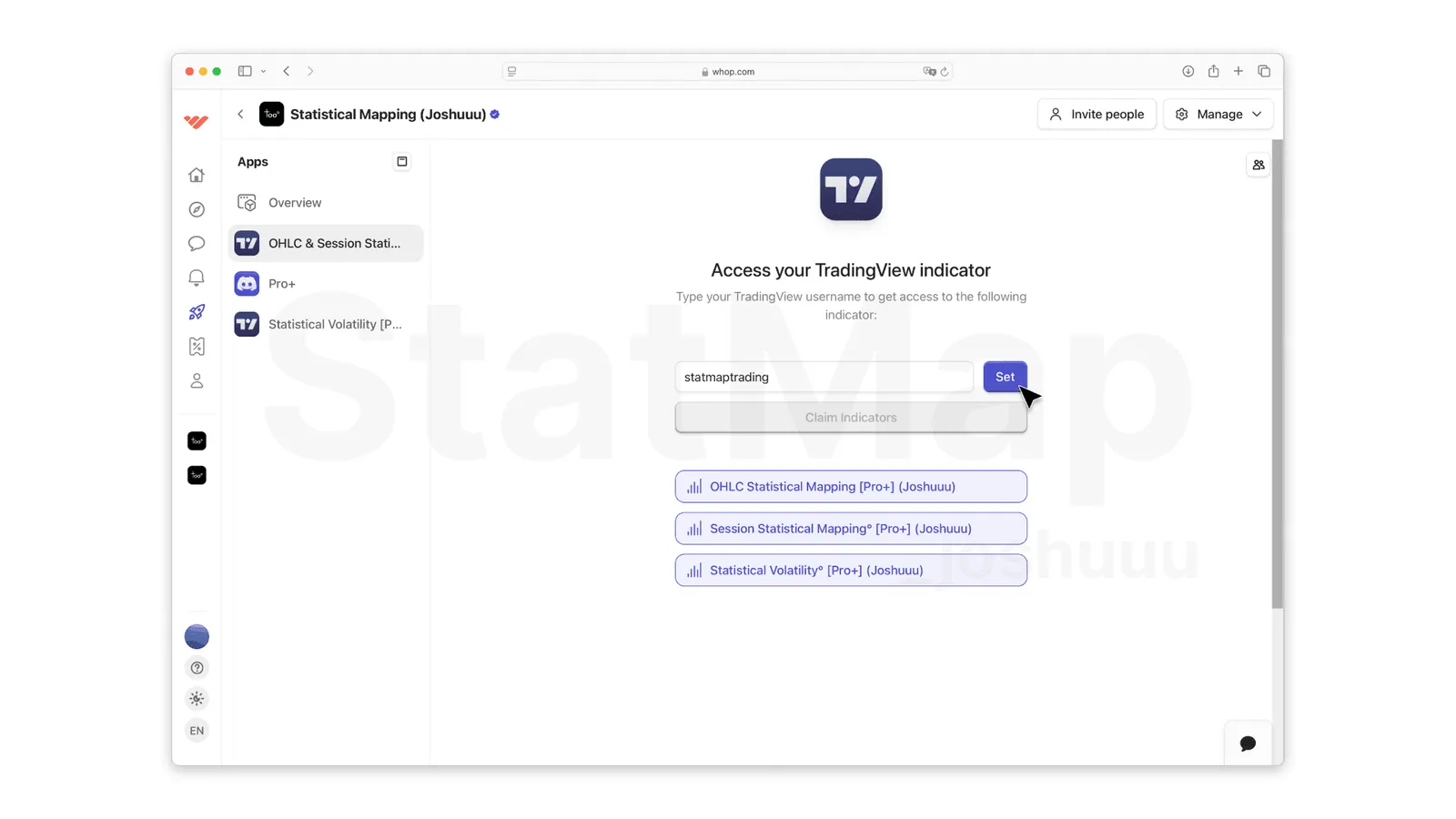
订阅后,在 Whop 打开你的 StatMap 会员页面 whop.com/statmap,进入 TradingView 权限页面。在那里:
- 输入你的 TradingView 用户名。 请填写 TradingView 账户的准确用户名,而不是邮箱地址。
- 点击 Set。 这会把你的 Whop 会员资格与 TradingView 用户名关联起来。
- 点击 Claim Indicators。 用户名验证通过后,指标就会为你的 TradingView 账户解锁。
第 2 步:在 TradingView 中添加指标
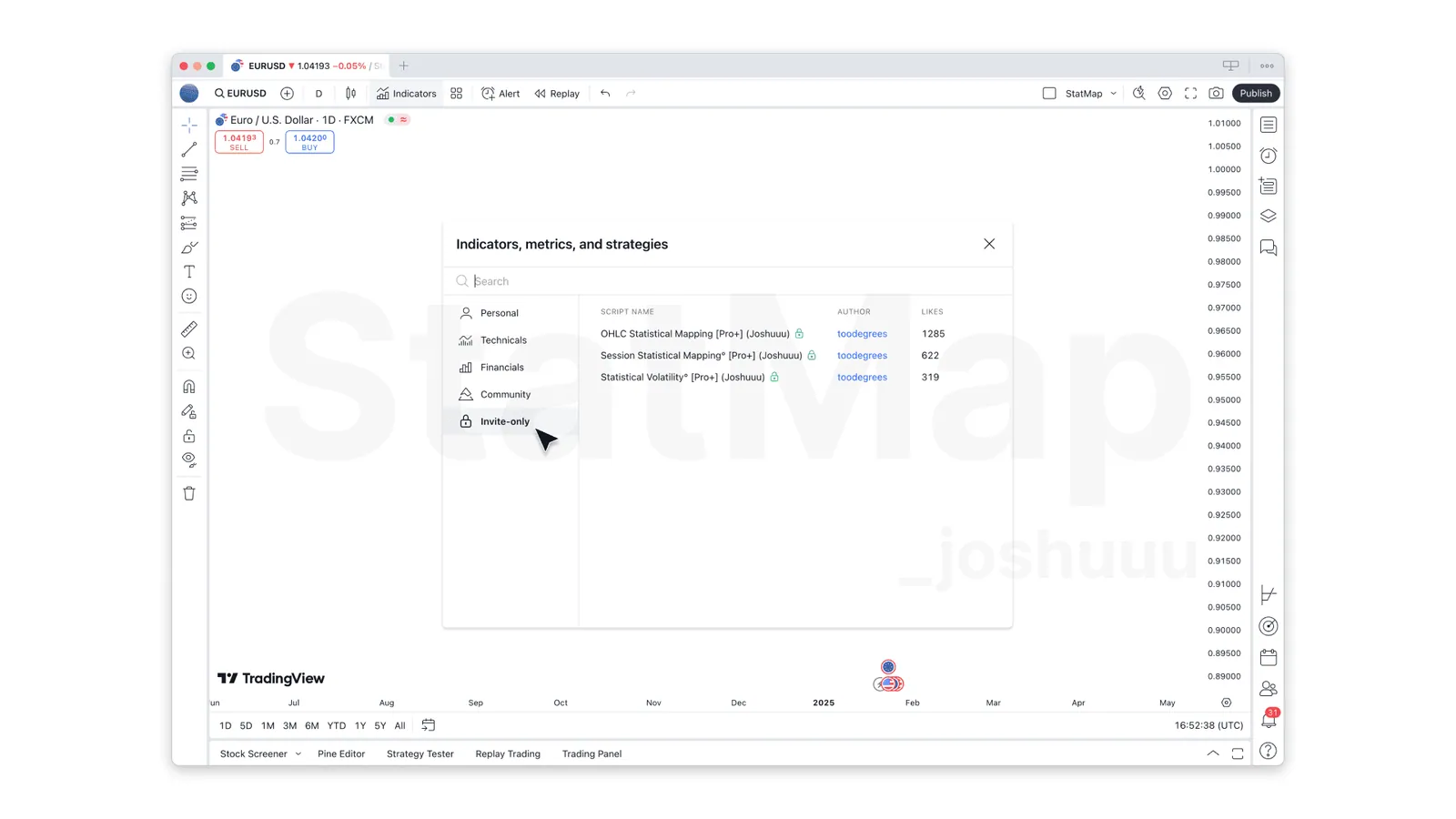
- 在 TradingView 中打开一个图表,点击顶部工具栏的 Indicators。会打开 Indicators, Metrics and Strategies 窗口。
- 进入 Invite-only 分区,你会看到:
- Statistical Mapping°
- Statistical Volatility°
- 点击指标即可添加到图表。
如果指标没有出现,请刷新 TradingView,并检查你在 Whop 输入的用户名是否与 TradingView 用户名完全一致。
仅运行 StatMap° 和 StatVol° 并不需要付费的 TradingView 方案。部分 TradingView 功能有各自的方案限制,例如免费的 Basic 方案不支持自定义周期。
第 3 步:首次设置
从简单开始,等你理解了图上显示的内容,再逐步增加复杂度。
Statistical Mapping°
- 启用 一个与你交易方式相符的时间框架行,例如 1D,其他行暂时保持关闭。
- 将 Calculation Lookback 保持为 60 个样本,以获得稳定的统计。
- 选择 Calculation Method:Median 得到更保守的水平,Mean 得到更远的水平,Both 则显示两者之间的区间。
- 在 Style 设置中只启用 你实际交易的水平。这也会限制哪些水平发送警报。
- 开启 Liquidity,查看摆动高低点在哪里与投射水平对齐。
刚接触这五个水平?在用它们交易之前,先阅读什么是 Statistical Mapping?。
Statistical Volatility°
- 确认 Statistical Displacement 已启用。
- 选择 Type:Range、Body 或 FVG。
- 设置 Volatility Filter。Medium(300%)是不错的起点,之后再根据你的市场调整。
- 为位移选择图表时间框架或更高的 Timeframe。
- 开启 Graph Pane,查看一天中哪些时段通常最活跃。
所有选项都在 StatMap° v4 设置参考 中有说明。
下一步
- 警报: 通过在 TradingView 设置提醒,为水平触及和位移设置通知。
- 布局: 通过复制 TradingView 布局,把你的配置保存为 TradingView 布局,或复制他人分享的布局。
- 帮助: 加入 StatMap Discord,提问并查看其他交易者的设置。关于 Whop 会员的账单问题,请使用你的 Whop 账户设置,或写信至 contact@stat-map.com。
放到你的图表上
获取 TradingView 版 Statistical Mapping° 与 Statistical Volatility°,或向 StatMap AI 询问设置问题。
相关文章
StatMap° v4 设置参考
StatMap° v4 设置参考按 TradingView 设置对话框的顺序,逐项说明 Statistical Mapping° 与 Statistical Volatility° 的全部选项,包括计算、时间框架与会话、样式、流动性、统计位移、Graph Pane、表格和警报,帮助你了解每个设置的作用。
在 TradingView 设置提醒
在 TradingView 设置提醒,让你不用一直盯盘也能跟上行情。本文说明 StatMap° 与 StatVol° 分别提供哪些提醒,如何选择 Any alert() function call 条件,如何设置名称、到期时间和通知方式,以及修改指标设置后为什么需要重新创建提醒。
StatMap° v4 警报:可以对哪些事件设置警报
本指南列出第 4 版中 StatMap° 与 StatVol° 会对哪些事件发出警报:水平触及、流动性被扫,以及位移的 Creation、First Touch 和 Midpoint Touch,并展示消息示例、减少警报的方法和在 TradingView 中创建警报的步骤。